Alex Buckles
How to Run Account Mapping Sessions That Actually Happen

Short answer: Account mapping sessions are meetings where your sellers and a partner’s sellers review the accounts you share and agree on next steps. Most programs say they run them. Few hold them on a steady rhythm. They happen when they’re dedicated meetings, scheduled on a cadence plus a few triggers, with agendas set by AI from overlap data, and with every commitment tracked to an owner and a date.
Why account mapping sessions matter more than anything else
If I could ask a partner leader one question, it would be this: how many account planning sessions are you holding, on a regular basis, with each partner? That’s the brass tacks of partner management.
Everything else supports those meetings. Always-on partner communications keep relationships warm between sessions. But comms alone won’t build the human relationships that produce referrals. That still comes down to two sellers talking about real accounts.
And the win isn’t the data flowing between companies. It’s getting commitments to hold regular sessions. So write it down, partner by partner: the agreed cadence and how each side pings the other when something comes up.
What counts as a real account mapping session
A lot of meetings get called account mapping. Most aren’t. I use a simple test with three parts.
- Dedicated: It’s its own meeting. Ten minutes borrowed at the end of a monthly partner sync doesn’t count.
- Named: Real accounts are on the agenda before anyone joins.
- Both ways: Value moves in both directions. Each side brings accounts and leaves with something.
If a meeting fails any of the three, it’s a status call. Status calls don’t produce pipeline.
Three triggers, not one cadence
Most teams set a monthly cadence and stop there. But overlaps don’t arrive on a schedule. So we use three triggers.
Recurring sessions
The partner manager sets these. Monthly is typical. Your team owns them, and they’re the backbone.
Situational sessions
Sometimes one new, high-value overlap shows up. A big account just became a partner’s customer, or a shared prospect just opened an opportunity. That deserves a quick 15-minute session now, not at next month’s meeting.
Threshold sessions
Then there’s the pile-up. Once three to five overlaps build up with one rep, it’s time to book a 30 to 45 minute session. Otherwise good accounts sit and go stale.
The recurring sessions are your team’s job. The other two need someone watching the data every week. That’s the part most programs miss.
How to set the agenda from overlap data
The worst account mapping session starts with two people searching a tool for ten minutes. Then they rush the conversation that actually matters.
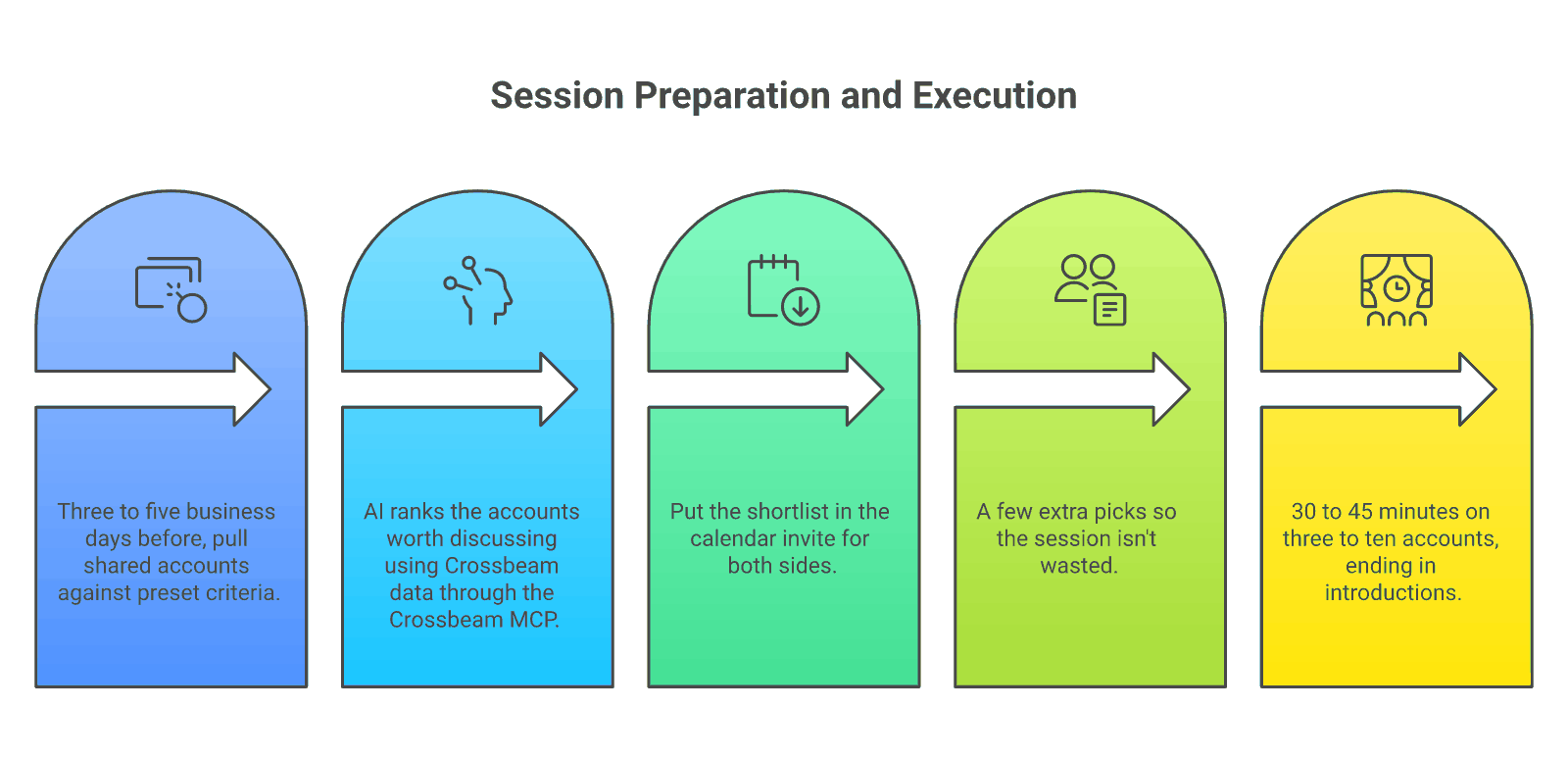
So the agenda should be built before the meeting. Here’s how we do it:
- Pull the overlaps early: Three to five business days before the session, pull shared accounts against preset criteria.
- Let AI shortlist them: AI working with Crossbeam data, through the Crossbeam MCP, ranks the accounts worth discussing.
- Load the invite: Put the shortlist in the calendar invite and send it to both sides.
- Ask both sides to add accounts: If a few of the AI’s picks turn out to be duds, the session isn’t wasted.
That way the meeting is a conversation about accounts, not a search party. Crossbeam’s team describes the same idea in turning ecosystem data into pipeline faster.
How long a session should run
Short is fine. Even 30 minutes works if it covers about three accounts and ends in introductions. For a bigger list of around ten accounts, plan on 45 minutes.
End every session with tracked commitments
A session without commitments is just a conversation. So every session ends with named owners and dates.
At minimum, two commitments come out of each meeting: who pulls the next set of accounts, and who does the sending. Then capture every action item, owner and date from the recording into the partner’s success plan. If nobody writes it down, nobody does it.
This is where most programs leak. Two sellers agree to something on Tuesday. By Friday, both have forgotten. Tracked commitments, with someone following up, close that leak.
How to get reps to show up
Partner reps are busy. If the meeting feels like a favor to you, it won’t get booked.
Use investment language, not request language
So don’t ask for time. Offer an investment. One line I use often: “Does that sound like a good use of our time, if I were to advocate that we invest in you?”
Do the prep for them
Then make the session easy. The accounts are pulled, the agenda is in the invite, and the follow-up is handled. Their only job is to show up and talk about customers they already know.
Don’t wait on tool approvals
If a partner can’t connect its data yet, don’t stall. Ask for a manual account list, upload it as an offline partner and run the overlaps. You can start this week.
How to track whether sessions happen
You can’t manage what you can’t see. Fortunately, the tracking is simple.
Name every session the same way: “account planning” or “account mapping” plus the accounts, with recording on. Then your calendar and call data can count sessions per partner automatically.
Measure accounts planned, not meetings held
But the number of meetings isn’t the goal. It’s how many accounts you actually plan around. That’s the leading indicator of pipeline.
Early on, though, track sessions scheduled and held. A great GTM motion does nothing without meetings on the calendar. So get a weekly commitment on sessions scheduled and held, per partner. The weekly count shows you exactly where sessions aren’t happening, and that’s where you go next. If you’re new to the mechanics, start with how to do account mapping with a partner. For more on the basics, PartnerStack’s account mapping guide is a good primer, and our post on account mapping for sales covers the seller’s side.
How Forecastable runs account mapping sessions
At Forecastable, we deliver partner-sourced pipeline as a service. We build your partner program and run it with you or for you, and we’re measured on pipeline and revenue.
So we plan account mapping and account planning sessions for your partner managers and sellers. And we make sure they’re scheduled and held, on a regular cadence or as needed. AI sets the agendas from overlap data. And every commitment lands in the partner’s success plan, where our team follows up.
There’s no new tech to buy and no seats. No PRM required. Co-sell automation is included in every program, running on your Crossbeam data and the AI tools you already own. Partners can fund or co-fund the program through MDF, so it can cost you $0. See how it works on the Accelerate My Partner Program page.
FAQ
What is an account mapping session?
It’s a dedicated meeting where your sellers and a partner’s sellers review accounts you share and agree on next steps, such as introductions or joint outreach.
How often should you hold account mapping sessions with a partner?
Monthly is a good default. Add a quick session when a high-value overlap appears, and book a longer one when three to five overlaps build up with one rep.
How long should an account mapping session be?
Thirty minutes for about three accounts, or 45 minutes for around ten.
Who should set the agenda?
Your operations team or AI should pull and shortlist overlaps a few days ahead, then load them into the invite. Both sides can add accounts.
How do you know if account mapping sessions are working?
Track sessions scheduled and held per partner at first. Then track how many accounts you plan around and the pipeline that follows.
The bottom line
Account mapping isn’t a report. It’s a meeting between two sellers, and it only works if it happens. Make the sessions dedicated, trigger them from the data, set the agenda before anyone joins, and track every commitment. Then count the sessions every week until the habit sticks.
Related reading:
Uncover Your Growth Potential
Schedule a Discovery Call