Account Mapping: What It Is and How to Run a Session That Produces Pipeline

Short answer: Account mapping is the practice of comparing your account lists with a partner’s to find the companies you share, then deciding together what to do about each one. Finding the overlap is the easy part. Pipeline comes from what happens next: an agenda of named accounts set before the meeting, a clear exchange of value on every account, and an owner on every step with due dates for every action.
What is account mapping?
Account mapping is how two companies find where their customers, prospects and open deals overlap. You match your CRM data against a partner’s and look at the accounts on both sides.
Crossbeam is the data layer we use and recommend for this. It turns CRM records into match lists it calls Populations, such as customers, prospects and open opportunities. Then it shows where yours intersect with each partner’s. Crossbeam describes account mapping as cross-referencing your pipeline with a partner’s list, and it lets you control how much each partner sees.
The output is the Account Mapping Matrix. Your Populations run down the side and your partner’s run across the top. Each cell is a scenario, like “my prospect, their customer.” Click into a cell and you get the list of accounts behind it.
But a matrix full of overlaps isn’t pipeline. It’s a list of reasons to have a conversation, and one piece of a partner ecosystem that produces pipeline. It’s also the fastest path to early wins with a new partner, so don’t let setup work delay the first session.
What is partner account mapping, and how is it different from sales account mapping?
The term gets used two ways. In sales, “account mapping” can mean charting the stakeholders inside one target account. Partner account mapping is the version this post covers. It compares account lists across two companies so each side can help the other win.
Why do most account mapping sessions fail?
Here’s how most sessions go, even at teams that take account mapping seriously. A partner manager squeezes a few accounts into the end of a regular check-in. Or they hold a real session, and someone opens Crossbeam live and starts clicking. The first ten minutes of a 30 minute call go to figuring out which accounts are even worth discussing.
So the problem usually isn’t finding the overlaps. It’s two other things:
- Nobody sets the agenda before the call. The research happens live, in the meeting, on both people’s time.
- Nobody owns the next step after it. An intro gets promised, and it sits there.
There’s a third problem when reps work overlaps on their own. A rep sees that ten partners have their target account as a customer. Because they don’t know which partner to ask first, they either ignore it or message several partners at once. That creates friction with the partner. Reps need instructions on a silver platter, and you can’t train them to master both partnerships and sales.
How do you plan account mapping with a co-sell scenario matrix?
Start with the GTM motion, not the tool. Before anyone opens Crossbeam, decide which scenarios you’ll work with each partner and which GTM motion runs in each one. We call this co-sell scenario planning. It takes four steps:
- Name the segments on both sides. Your segments go down the side: customers, open opportunities and prospects. The partner’s go across the top. Split them further if it helps, by product line, vertical or region.
- Pick the scenarios worth the most. Each cell is a co-sell scenario, and each one maps to a list of accounts. Some cells matter far more than others.
- Count the overlaps. Multiply the overlaps in each cell by your average contract value. That’s the revenue potential, and it tells you where to aim first.
- Select a few focused scenarios. Pick two or three to run. Work the lowest-friction cells first. Don’t try to boil the ocean.
Then write down how each scenario will run. Every scenario needs the same four things: a target account list, an owner, a GTM motion and someone accountable for the follow-through.
| Scenario (yours, theirs) | Exchange of value | Typical GTM motion |
|---|---|---|
| Customer, customer | Mutual | Upsell, cross-sell or expansion for shared customers |
| Prospect, customer | Ask | The partner introduces you to the buyer they already serve |
| Open deal, customer | Ask | The partner shares what they know about the buying committee, or advocates for you |
| Closed-lost, customer | Ask | Wake-the-dead outreach with the partner’s context |
| Customer, prospect | Give | You introduce the partner to your champion |
| Open deal, open deal | Mutual | A joint call plan and one coordinated next step |
| Prospect, prospect | Mutual | Co-invest in top of funnel with a joint webinar, event or door-opener offer |
One more rule before anything reaches your reps: validate each partner’s data first. If reps get a list that isn’t real, they stop trusting the data. And two placement rules save a lot of pain. Closed-lost accounts get wake-the-dead framing, not a fresh pitch. And cold net-new accounts get warmed up first. So don’t lead with a give on an account where nobody knows you yet.
How do you run an account mapping session?
The fix is simple. Give account mapping its own session, and do the research before the meeting, not during it. Here’s the format we use.
Before the session: pick the scenarios and set the agenda
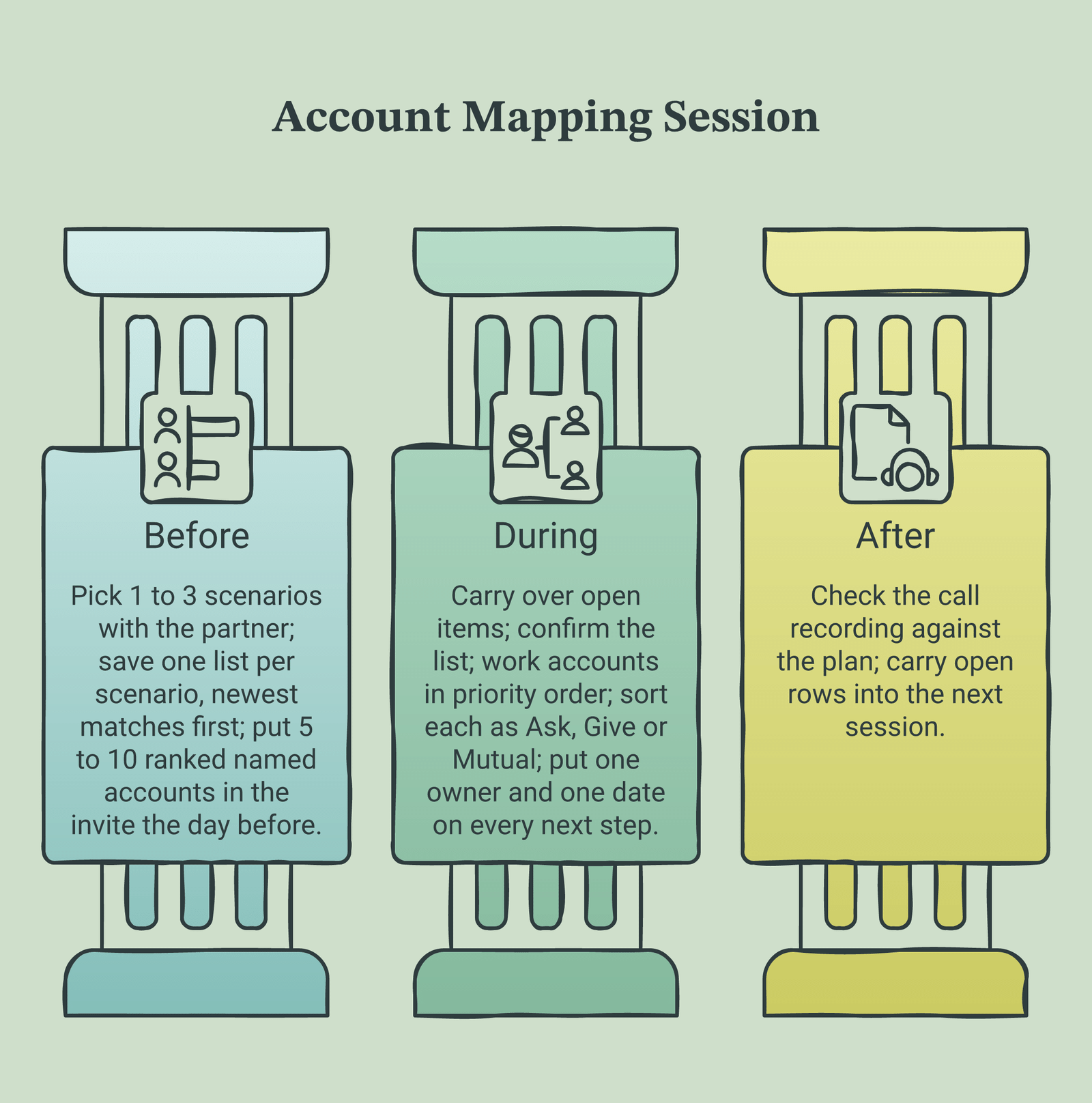
First, agree with each partner on which co-sell scenarios from your matrix you’ll map around regularly. You don’t need every cell in the matrix. Pick one to three, such as shared customers, your prospect who is their customer, and open opportunities on both sides.
Next, build one saved list per scenario. In Crossbeam you can drill into a matrix cell, filter it, choose your columns and save it as a List. Crossbeam also lets you turn on notifications for new matching accounts. Sort each list by match date so the newest overlaps sit at the top. For open deals, sort by the date the opportunity opened instead, because a newly opened deal is usually the active one.
Then, the day before the meeting, pull the newest named accounts from each list. Rank them in case you run out of time. Put them in the calendar invite. When both people show up, the agenda is already there.
For example, we worked with a finance software company whose partner managers held weekly sessions, mostly with services partners. Every Monday, our team pulled the Crossbeam data for Tuesday’s calls and updated each invite. First, we asked each partner manager how many overlaps they could cover. One said about ten with one partner and about five with the rest. His top scenario with that first partner was closed-lost deals, so those went first.
The 30-minute account mapping agenda
Once the accounts are in the invite, the meeting runs itself. Here’s the order we use:
- Carry over open items. Start with anything still open from the last session.
- Confirm the list. Read out the named accounts from the invite. Swap any that changed since yesterday.
- Work the accounts in priority order. Start with the scenario the partner cares about most, so the important accounts get covered if time runs short.
- Make the ask, offer the give or plan the mutual move. You sorted each account before the call.
- Put an owner and a date on every next step. Read them back before you hang up.
That last step is where the value leaks, because people meet and talk about a lot of things that do nothing. So we close the loop with the call recording. We compare the accounts the team planned to cover with what was discussed, then capture each next step and owner.
It’s also the list your partner reps need. We center partner enablement on activation, and activation starts from named accounts, not training.
Ask, give or mutual: what exchange of value does each overlap need?
Every account on your agenda needs a clear exchange of value, and it fits one of three types. Sorting them before the call tells you who’s asking for what, so the conversation stays short.
| Type | Trigger | Who benefits first | Typical next step | Owner |
|---|---|---|---|---|
| Ask | Your target or open deal is the partner’s customer | You | Partner introduces you to their contact | Partner contact, with your rep on the thread |
| Give | Your customer is the partner’s prospect or open deal | The partner | You introduce the partner or share context | Your CSM, account manager or partner manager |
| Mutual | You both have open opportunities at the account | Both | Agree on a joint touch or a shared call plan | One named owner on each side |
What counts as an ask?
An ask is any account where you need the partner’s relationship. There are three common versions:
- Target account: you want in, and they have the customer. Introduce me.
- Open opportunity: you’re in a deal, and they have the customer. Tell me what you know.
- Closed-lost deal: you lost it, and they still have the customer. Help me wake it back up.
Why do gives matter so much?
Because the relationship has to run both ways. Even Crossbeam’s own guide on what to do after you find overlaps tells you to return the favor. Find your customers who are the partner’s prospects and offer them up. And when a partner opens a deal at one of your customers, send that rep what you know before they ask. That goodwill comes back when the roles reverse.
When is an account mutual?
When you both have an open opportunity at the same company. Going in together can shorten the cycle and grow the deal, because two buying committees line up instead of one. But if the two deals compete for the same budget, sometimes it’s better not to co-sell. When it works, plan it like a deal, not a favor.
Account mapping agenda template you can copy
This is the account mapping template we use. Copy the table into a sheet, add a tab per partner, and fill it in the day before each session. Then paste the account rows into the calendar invite.
| Scenario | Account | Ask / give / mutual | Owner | Next step | Due date |
|---|---|---|---|---|---|
| My prospect, their customer | Account A | Ask | Partner AE | Intro email to the VP Finance | Nov 14th |
| My closed-lost, their customer | Account B | Ask | Partner CSM | Share why they renewed with the partner | Nov 14th |
| My customer, their prospect | Account C | Give | Our account manager | Warm intro to our champion | Nov 17th |
| Open deal on both sides | Account D | Mutual | Both AEs | Joint call plan before next stage | Nov 19th |
| New match this month | Account E | Ask | Our partner manager | Confirm the partner’s contact and fit | Nov 21st |
A few rules keep the template honest:
- One owner per row. “Both teams” isn’t an owner. Pick a name.
- One next step per row. If it takes two steps, write the first one.
- A real date. “Next week” slides. A date doesn’t.
- Carry open rows forward. Start the next session with anything still open from the last one.
How often should you map accounts with a partner?
It depends on how many accounts you share. More overlaps means more sessions. Either way, expect two phases.
First comes the initial pass through the historical overlaps in each scenario you picked. That can take a month or two.
After that, move to a regular rhythm, often monthly. By then the backlog is done, so each session focuses on new matches. That’s why sorting by match date matters: the top of the list is what’s changed since you last met. Also, overlap lists make good invite lists for partner field marketing events.
What tools do you need for account mapping?
You need three things:
- A partner data platform. Crossbeam is the one we use and recommend. It finds the overlaps and keeps them current without either side handing over raw CRM exports.
- A shared agenda. The template above in a sheet works fine. The point is that it exists before the meeting.
- A place to track next steps and owners. If your CRM can’t hold partner records cleanly yet, don’t wait months for the fix. Give next steps a temporary home.
If you’re comparing platforms, our guide to account mapping software covers the account mapping tool options in more depth.
The tool won’t run the session for you, though. My recommendation is to centralize this work, with one standard way to pull the data into agendas, instead of every partner manager doing it alone. That’s the work we take on with our account-mapping service. A real person works your Crossbeam overlaps every day, runs the mapping sessions with next steps owned, and runs “give” motions that send leads to your partners. It’s $7,500 a month part time (20 hours a week) or $12,000 a month full time, and it requires Crossbeam. You can run it on its own or alongside GTM motions with your partners.
How do you know account mapping is producing pipeline?
Count outcomes, not sessions. A mapping call proves nothing if nobody acts on what was promised. Track these instead:
- Intros made. How many asks turned into a real introduction.
- Meetings held. How many of those intros became a meeting on a rep’s calendar.
- Pipeline created. How many became opportunities, and how much they’re worth.
- Gives delivered. How many accounts you sent the partner, because that’s what keeps the asks flowing.
Then tag the deals correctly. A meeting a partner opened belongs in partner pipeline, but credit follows each platform’s own attribution policy. So it’s worth knowing how partner-sourced and partner-influenced pipeline differ before you report it.
Related reading
- Account-Mapping ROI: How to Justify the Spend to Finance
- Account Mapping Template: How to Build and Use One
- Account Mapping Tool: How To Choose and Use One
- Account Mapping Tool Integration: A Practical Guide
- Account-Mapping Tools: A 2026 Buyer’s Guide for Partner Teams
- The Needle in the Haystack Partner Problem
Frequently asked questions
What does account mapping mean?
It means matching your account lists against a partner’s to find shared customers, prospects and open deals. Then you agree on what each side will do about each shared account.
How long should an account mapping session be?
Thirty minutes is enough when the agenda is set in advance. If you’re picking accounts live in the meeting, you’ll need closer to an hour.
How many accounts should be on the agenda?
Five to ten, ranked. Ask the partner manager how many they can cover with each partner. Then if you run out of time, you’ve covered the ones that matter most.
Can sales reps run account mapping themselves?
They can see the data, but it often goes badly. Reps don’t know which partner to ask first, so they ignore it or ask several at once. A partner manager or a dedicated team should own the agenda and route the asks.
Can you do account mapping without Crossbeam?
Yes, to start. Share customer lists under an NDA and run the same scenario planning in a spreadsheet. Then move into Crossbeam, first with uploaded lists and later with connected CRMs.
Is there a free account mapping template?
Yes. Copy the agenda template table above into a sheet. It has the six columns you need, from scenario to due date.
The bottom line
Account mapping works when it’s treated like a sales meeting, not a data review. Pick your scenarios with each partner. Set the named accounts in the invite before the call. Sort every account as an ask, a give or a mutual. And put one owner and one date on every next step.
Do that and 30 minutes is plenty. Also, it frees your partner managers for the job that actually matters. They’re in the relationship business, not the list-building business.
Forecastable is an independent third-party professional services company, a B2B partnerships agency and Crossbeam’s Solutions Partner of the Year. Our evaluations of other vendors are based on publicly-available information as of November 2026 and our own client experience. Crossbeam feature details are drawn from Crossbeam’s public pages and help center and were last checked on November 8th, 2026.
Want your overlaps worked every day, with every next step owned? Book a Program-Fit Analysis
Uncover Your Growth Potential
Schedule a Discovery Call