Account Mapping
Co-Sell
Crossbeam
Crossbeam MCP
Ecosystem-Led Growth
Model Context Protocol
Partner Operations
 Alex Buckles
How and When to Use Crossbeam’s MCP Server, With Prompts

Short answer: Crossbeam’s MCP server changed the game for partner teams. It puts your ecosystem data inside the AI tools you already use, and since September 1, 2026 it’s available on every Crossbeam plan. The payoff comes when you treat it as the engine for co-sell automation and campaign operations, not a faster dashboard. Anyone acting only on overlap alerts is underusing the partner data they already have. Below are the prompts that move pipeline, by role, and the operating model that makes them compound across dozens of partners.
What the Crossbeam MCP server is
The Crossbeam MCP server is a remote endpoint that gives AI assistants permissions-aware access to your Crossbeam data over the open Model Context Protocol. Once it’s connected in Claude, ChatGPT, Glean or another MCP client, an assistant can pull partner overlaps, account context, shared contacts and partner recommendations in plain language.
According to Crossbeam’s MCP server documentation, it became generally available on all plans, including Free and Connector, on September 1, 2026. Usage draws on Crossbeam credits, pooled by plan. The tools are read-only, so actions like emails, Slack posts and CRM updates happen in the other tools your assistant connects to.
The tools fall into three groups:
- Who you work with:
find_overlapping_partners,get_partner_context,get_partner_suggestions,find_partner_recommendations. - What’s happening on an account:
find_overlapping_accounts_and_leads,get_account_context,find_partner_shared_contacts,get_partner_overlaps_shared_context,find_new_accounts,get_ecosystem_activity. - How to do it well:
search_crossbeam_knowledgeandget_list_link.
Crossbeam’s launch announcement covers the native connectors and use cases. Check the docs for the current tool list before you quote it in a board deck. It keeps moving.
The descriptive trap
At first, most teams start with descriptive prompts. “Which partners have the most overlap?” “Who are our most active partners?” Those are fine for a tour. But descriptive prompts aren’t pipeline. They’re a faster dashboard.
A prescriptive prompt does three things at once:
- It pulls the data.
- It filters that data against a real situation: a specific account, deal stage or renewal.
- It ends in a next action: an intro request, a draft note, an agenda or a GTM motion to launch.
If the prompt ends with a list, you’re still describing. If it ends with a recommendation or a draft, you’re producing pipeline.
Prompts that move pipeline, by role
Each prompt below is a starting point. Tighten it to your data.
Account executives
Warm-path discovery before the first call. “For [Account], show which partners overlap with it and pull the account context and any shared contacts. Tell me which partner to involve first and why.” The action: ask the right partner manager for the intro, or message the partner’s account owner directly.
Who to bring into this deal. “For [Account] at [stage], which partners have the strongest relationship there and what would each add? Recommend one.” This is the line an AE uses when asking their manager for an extra week to bring a partner in.
Partner managers
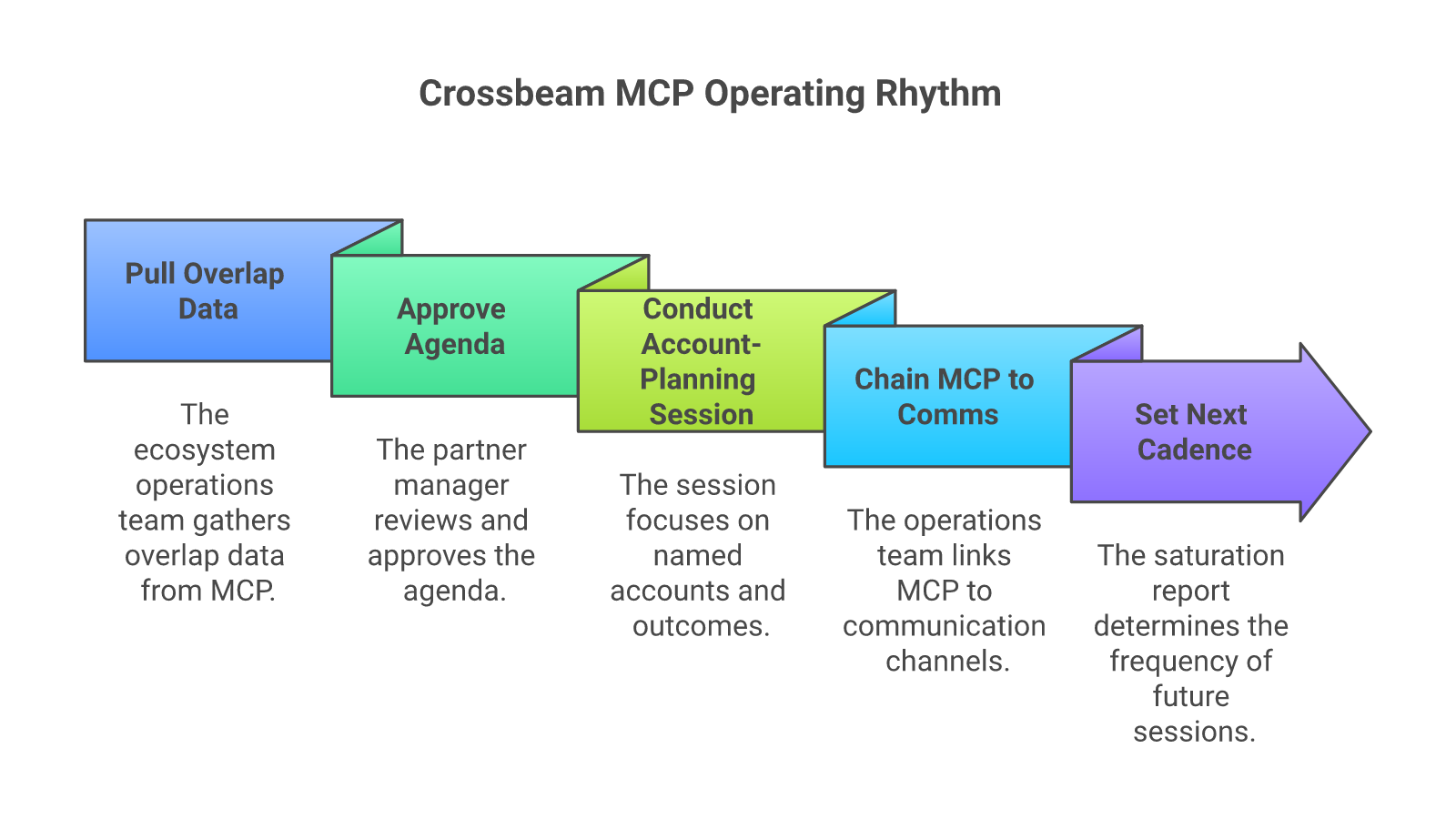
Daily overlap triage. “List new overlapping accounts and leads since yesterday, grouped by partner. Compare against our top 100 targets and propose one next action per row: intro request, account planning add, expansion check or no action.” Route it to one Slack channel. Triage takes minutes, not an hour.
Account mapping session prep. “For my session with [Partner] on [date], pull the top ten shared accounts where they’re more active than we are, plus three accounts they’d likely want help opening. Format it as an agenda.” Agendas should land three business days before the meeting, not three hours.
New partner recruiting. “Suggest five potential partners whose customers overlap most with our ICP, ranked by fit, with a short recruit rationale for each.” Each candidate arrives with a reason, not just a name.
Customer success
Renewal air cover. “For every renewal in the next 90 days, which partners overlap with the account and who on their side should we loop in before the renewal call?” A customer success manager can recruit an outside voice before the conversation gets defensive.
RevOps and the CRO
Attribution check. “For last quarter’s closed-won deals, show where partner activity on the account preceded the deal but the CRM source says direct. Sort by deal value and partner.” The leak that bleeds partner credit into the direct column shows up in one query.
From prompts to co-sell automation
One rep running one prompt is useful. But the real shift is running these prompts on a schedule, for every partner, with a human approving what goes out. That’s co-sell automation.
In our programs, this runs every day on Crossbeam data:
- New overlaps get matched to a GTM motion. Each stored motion lists the partner, the account criteria and the signals it needs. When a new overlap qualifies, Eva, our AI agent, flags it and recommends the motion.
- A human approves the action. Our team or yours greenlights the intro, the note or the campaign. Nothing auto-sends.
- The motion launches. Sequences, calls, events or webinars go out as you, as the partner or both.
- Results roll up. Leads, SQOs and closed-won deals are tracked per partner and per motion.
Co-sell automation is included in every Forecastable program. It runs on Crossbeam data and the AI tools you already own. There’s no new tech and no seats to buy.
Campaign operations across dozens of partners
This is where the MCP server earns its keep. Running one GTM motion with one partner is manageable by hand. But running motions with dozens of partners at once isn’t.
Campaign operations at that scale need three things:
- A shared view of every account. If three partners overlap on one target, the account should get one coordinated story, not three competing ones. Crossbeam data is what makes that view possible.
- Communication limits and gaps. Suppress a touch if someone already reached the contact inside a set window. Fire a touch only when a contact has gone quiet. Cheap drafting makes over-broadcasting the default, and the partner relationship is exactly what a noisy agent erodes fastest.
- One owner for the rhythm. A central operations team runs the triage, the session prep and the campaigns. Partner managers stay in the relationship instead of building lists.
We call this controlled surround sound. Motions can run as the platform, as the partner or both, sending different messages at different stages. The target account hears a consistent story, and no one gets overcommunicated.
What goes wrong, and how to spot it early
Treating MCP as a novelty. The CRO demos it once, the team uses it for a week and then forgets the connector exists. Ask one question weekly: how many sessions, deals or campaigns shipped with an MCP prompt in the loop? If nobody’s tracking it, the answer is zero.
Leaving prep to every partner manager. Half the sessions come out sharp and half improvised. Centralize the prep.
Over-broadcasting. Drafting got cheap. Sending more isn’t the goal. Apply communication limits on every queue.
How to know it’s working
Watch two leading indicators: partners with an account mapping session in the last 90 days, and accounts planned per partner per quarter. Then watch two lagging ones: partner-attached pipeline created, and cycle time on partner-attached deals versus solo deals.
If the leading indicators move and the lagging ones don’t, your prompts are still descriptive. Rewrite them to end in a recommendation or a draft.
Related reading
- MindMatrix vs Salesforce: What to Use for Partners
- Partner-as-a-Service: What It Is and When to Use It
- Partner Coordination Tools: What to Use and When
- Professional Services in SaaS: A 2026 Playbook
Frequently asked questions
Which Crossbeam plans include the MCP server?
As of September 1, 2026, Crossbeam lists the MCP server as generally available on all plans, including Free and Connector. Usage draws on Crossbeam credits, and connecting requires an eligible seat. Check Crossbeam’s documentation for current details.
Can the Crossbeam MCP server update my CRM?
No. Crossbeam documents its MCP tools as read-only. Actions like drafting an email, posting to Slack or updating a CRM record happen in the other tools your assistant connects to.
How is the MCP server different from Crossbeam’s Slack app or CRM widgets?
The Slack app and CRM widgets surface partner context inside the tools reps already use. The MCP server lets any AI assistant ask Crossbeam questions in plain language and chain the answer into other tools and workflows.
What is co-sell automation?
Co-sell automation runs partner prompts and next actions on a schedule instead of one rep at a time. New overlaps get matched to GTM motions, a human approves the action and results roll up per partner. Forecastable includes it in every program, running on Crossbeam data.
Should AEs use the MCP server directly, or should prep be centralized?
Both. AEs use it for in-the-moment questions. A central operations team runs the triage, the session prep and the multi-partner campaigns.
Next step
If you want this rhythm running across your partners without adding headcount, that’s what we do. See Our AI Team for how Eva works on Crossbeam data. For related reading, see the co-sell guide, ecosystem-led growth and why execution beats tooling, and best PRM software and what it won’t do for your pipeline.
Forecastable is an independent third-party professional services company. Our evaluations of other vendors are based on publicly available information as of October 2026 and our own client experience.
Book a Program Fit Analysis → We’ll tell you which program fits and what it costs. Your partners may fund all of it.
Uncover Your Growth Potential
Schedule a Discovery Call