Account Mapping
Co-Sell
Crossbeam
Crossbeam MCP
Ecosystem-Led Growth
Model Context Protocol
Partner Operations
Account Mapping
Co-Sell
Crossbeam
Crossbeam MCP
Ecosystem-Led Growth
Model Context Protocol
Partner Operations
 Alex Buckles
How and When to Use Crossbeam’s MCP Server (plays included)

Short answer: The Crossbeam MCP server is exceptionally impactful when you treat it as the prescriptive layer for your co-sell motion, not a faster query bar. The descriptive prompts in Crossbeam’s MCP help documentation are a fair warm-up. But the prompts that move pipeline are the ones that chain ecosystem data to a next action: a warm-path intro, an account-planning agenda, an at-risk renewal save. Below are 10 plays Crossbeam Supernode and Enterprise customers can run this week, the prompt language that drives each one, and the operating model that makes the value compound.
What the Crossbeam MCP server actually is
The Crossbeam MCP server is a remote endpoint, currently in Limited Availability for Supernode and Enterprise customers, that exposes 12 Crossbeam tools to AI assistants over the open Model Context Protocol. The tools define what specific pieces of Crossbeam data your AI assistant can pull in as context. Once you connect it inside Claude or ChatGPT, an assistant can pull partner overlaps, partner suggestions, record-level deal signals, partner populations, and the partner leaderboard on demand. Authentication is OAuth, the connector is published in both AI marketplaces, and SAML SSO is still on the roadmap.
The twelve tools split neatly into three groups.
First, it answers “who do I work with“: find_partners, get_partner_tags, get_partner_suggestions, get_partner_leaderboard, get_own_populations, get_partner_populations.
Second, it answer “what is happening on this account”: get_own_account_info, get_account_overlap_info, get_record_signals.
Third, it answers “how do other Crossbeam customers do this“: search_help_center, search_blog_site, search_elg_book. Read those three buckets out loud and you can already feel where the value is.
One housekeeping note. The server is in active development, the documentation will keep moving, and access is gated by company domain during Limited Availability. So treat the tool list as the May 2026 snapshot and check the help center before quoting in a board deck. The picture of Crossbeam as an account mapping platform is unchanged; the picture of how you reach that data has shifted.
The descriptive trap most teams will fall into
Here is the trap. A good starting point is with descriptive prompts like, “Which of our partners have the highest win rate right now?” “Who are our most active partners?” “Which partners have helped us close deals the fastest?” Those are useful for a thirty-second tour. But descriptive prompts are not pipeline. They are a faster dashboard.
The prescriptive prompt is different. It does three things in one breath.
- It pulls the data.
- It scores or filters that data against a real situation: a specific account, a specific deal stage, a specific renewal at risk.
- It produces a next action: a warm-path intro recommendation, a draft note, a one-line agenda for the next account-planning session. So the AE or partner manager finishes the prompt with something to do, not something to read.
In our work with partnerships teams, I have seen Crossbeam customers stall at exactly this point in utilization conversations. The marketing admin owns the seat. The reps never log in. Renewal arrives and someone asks the predictable question. So if your team treats the MCP server as a chat-shaped dashboard, you will get the same outcome a year from now. But if you treat it as the prescriptive layer for the motion, you will spend the next quarter compounding instead of explaining.
The 10 Crossbeam MCP plays, indexed by role
Each play below names the tools the assistant uses, the prompt language to run it, and the action it produces. The prompts are starting points, not gospel. Tighten them to your various data shapes.
Account Executive plays
1. Warm-path discovery before the first call. Before any first conversation with a target account, an AE should know whether any partner already has a relationship there.
The prompt: “Show me every partner that has [Account Name] in their data and tell me which ones have a recent partner_deal_opened or partner_deal_closed_won signal. Give me our internal partner-manager owner for each match and the owner details from the partner’s side as well, if available.” The assistant chains get_own_account_info, get_account_overlap_info, and get_record_signals.
The action: ping the right partner manager and ask for the right intro or just write the account owner directly. Crossbeam’s own analysis puts the partner-attached win-rate lift in double-digit percentages; this play is how a single AE earns that lift without a multi-week mapping project.
2. Win-rate inference for partner-attached pipeline. Before engaging partners, know which players to put on the field first, objectively:
The Prompt: “From the partner leaderboard, pull the partners with the strongest win rate inside the [segment, geography, or ICP] my deal sits in, and recommend which to engage and why.”
The assistant chains get_partner_leaderboard against get_own_populations. This is the credibility line an AE uses with their manager when they ask for an extra week to bring a partner in. For deeper homework on the account itself, our guide on account research best practices is the natural next read.
Partner Manager plays
3. Daily overlap triage with suggested actions. A morning agent run that lists every new overlap since the last end-of-day, classifies each as customer, prospect, or joint, and queues a one-sentence proposed action per row.
The prompt: “List every new get_account_overlap_info result since yesterday at 5pm, group by partner, compare against our Top 100 target list (or equivalent in your specific case) and for each row propose the single highest-leverage next action: warm intro request, account-planning add, expansion check, or no action.”
The Action: Route the output to one Slack channel. Triage takes ten minutes a day instead of an hour.
Forecastable: To make this really sing, you should also have a data source that contains the joint value stories for each partnership. Forecastable creates this for customers and makes it available as part of its service.
4. Pre-session prep agent for account planning. Three business days before an account-planning meeting with a partner, run:
The Prompt: “For my session with [partner] on [date], pull the top 10 active overlapping accounts where the partner has more recent engagement than we do, plus three accounts the partner is likely to want help opening. Format as a meeting agenda.” The assistant uses get_account_overlap_info, get_record_signals, and get_partner_populations.
The Result: The partner manager and the account owner walk into a session already loaded. Spend the thirty minutes deciding and committing, not searching. Forecastable’s Co-Sell Alignment Specialists do this FOR customers, so every rep walks into account-planning sessions with an agenda, which is emailed in advance of the meeting.
Forecastable: The hardest part of this is knowing when account-planning sessions are happening. Forecastable’s service tracks these through calendar data and sets and tracks targets that must be achieved in terms of either number of account-planning sessions or number of accounts planned/actioned. Requires behavioral change though because these sessions must have specific words in the title or description to count. We have lots of tactics for making this trackable.
5. New-partner discovery against your ICP. When the question on the table is “who should we recruit next?”:
The Prompt: “Suggest five potential new partners whose customer or pipeline profiles overlap heavily with our ICP, ranked by ecosystem fit, and for each give a one-paragraph recruit rationale.” Uses get_partner_suggestions. Each candidate arrives with a dossier instead of a name in a CSV.
Forecastable: Our technology then kicks off recruiting sequences over email and LinkedIn to drive top-of-funnel conversations with new potential partners.
Customer Success and Account-Manager plays
6. Renewal air-cover map. For every renewal in the next 90 days.
The Prompt: “Which of our partners hold this account in their data, and which have a partner_deal_closed_won signal in the last 12 months on this account? Identify the partner advocate I should warmly loop in before the renewal call.”
The output is a partner advocate list per renewal. So a customer success manager can recruit an outside voice before the conversation gets defensive.
Forecastable: To get truly advanced here, have a value story library of each partner as a data source (Forecastable will create for you), so as part of your standard renewal process you review vendors they should be connected/integrated to, as well as potential partners they should be considering that will increase the value they derive from your offering.
7. Implementation partner shortlist. As early as possible in your sales cycle:
The Prompt: “Which service-delivery or SI partners overlap with this account in their own data and carry [vertical] or [product] tags? Sort by closeness of fit.” Uses get_partner_tags and get_account_overlap_info.
The Result: The new customer lands with an implementation partner who already knows the buyer instead of one assigned out of a roster.
Forecastable: The value story and case study library should be a data source as well, instead of relying on purely product and vertical tags. It requires effort, but when that data source is filled, reps will never questions again who to bring in and our team can help create the source from scratch and tie it to your ecosystem operating system.
CRO and RevOps plays
8. Sourced versus influenced revenue sanity check. Compare your CRM source field to Crossbeam’s signal log:
The prompt: “List every closed-won deal in the last quarter where a partner_deal_opened signal fired before the CRM source was set to direct. Sort by deal value and partner.”
The Result: The attribution leak that quietly bleeds partner credit into the direct column shows up in one query instead of a quarterly audit.
Ecosystem Operations plays
9. Always-on signal monitor that surfaces fresh deal events for value-add touches. Chain the MCP server to the comms layer. Each morning:
The Prompt (scheduled, ideally): “For every partner_deal_opened signal in the last 24 hours, draft a value-add note from the relevant partner manager to the partner rep listed on the signal. No asks. Surface the draft for review.” Pair this with the discipline that every touch passes a relevance check before it goes out.
The Result: This is the muscle that powers a healthy co-sell motion when it is run by humans who know the relationships.
Advanced: That one signal, in a silo, won’t always produce something actionable. If you combine it with other signals (prior Crossbeam signals, intent data, etc.), you can start getting really advanced in your recommended actions to reps, especially if you have the living value story library as a data source.
10. Partner saturation report so cadence follows data. Once a month:
The Prompt: “For each tier-one partner, show how many of their overlapping accounts we have planned against in the last 90 days, plus how many remain unplanned and active.” Saturation is the number that should set cadence, not the calendar.
A small partner with a handful of overlaps cannot absorb a weekly session. While a large partner with hundreds of overlapping accounts can.
Forecastable: This is almost impossible to track without behavioral change around calendaring (titles and descriptions), agenda setting, and calendar monitoring. Once this is in place, it will materially change your revenue outcomes, no matter the stage/size of your business.
Descriptive versus prescriptive prompts at a glance
The shift from descriptive to prescriptive is the whole game. Here is the same surface area, asked two ways.
| Descriptive (faster dashboard) | Prescriptive (compounding motion) |
|---|---|
| Which partners have the highest win rate? | From the leaderboard, which partner should I engage for this deal at this stage, and why? |
| Who are our most active partners? | For my next partner-manager session, which active partner is closest to saturation and which has 50+ unplanned overlapping accounts? |
| Which partners have this account in their pipeline? | Which partners hold this account, which have a recent closed-won signal, and which partner manager on our side should warmly loop in the rep? |
| Suggest new partners we should invite. | Suggest five new partners whose pipeline profile overlaps with our top 25 active opportunities, ranked by ecosystem fit, and draft a one-paragraph recruit rationale for each. |
So if the prompt ends with a list, you are still in descriptive territory. But if the prompt ends with a recommendation or a draft, you have crossed into the value layer.
The operating model that makes the plays compound
Plays do not stick by themselves. They stick when someone owns the rhythm. The working contract on a healthy Crossbeam program looks the same whether MCP is in the picture or not, and MCP magnifies it either way.
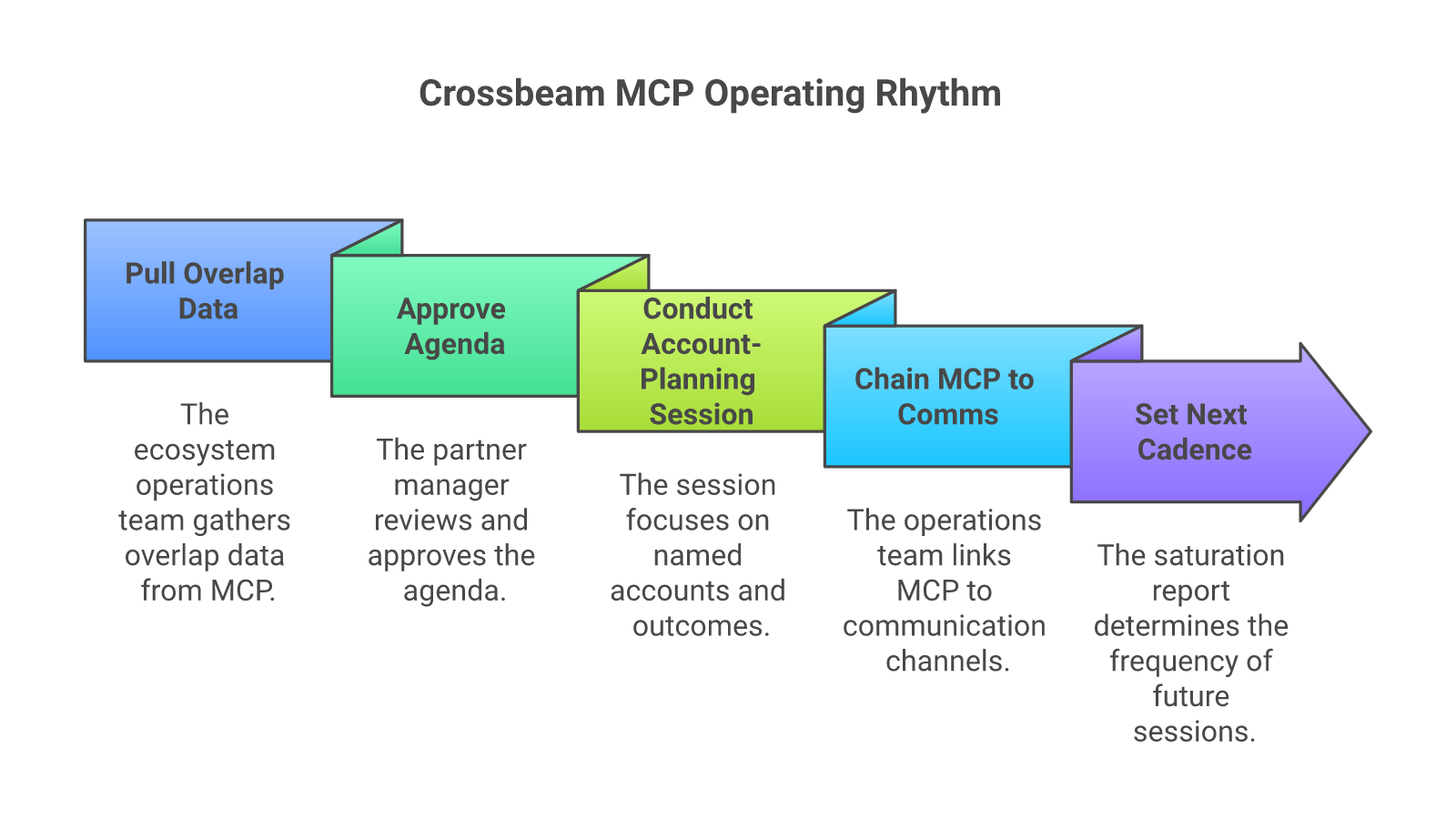
A centralized ecosystem operations team owns the prep. Partner managers own the relationship. AEs and CSMs walk into sessions already loaded. The ops team runs the daily triage in Play 4, the pre-session prep in Play 5, and the always-on signal monitor in Play 11. Then the partner manager greenlights what goes out and stays in the relationship instead of the list-building business.
Forecastable’s Ecosystem Orchestration role on a customer engagement is the Co-Sell Alignment Specialist, delivered as part of the service. The Specialist uses the Forecastable platform to run the rhythm and chain the prompts. Same operating muscle, two engines.
Two governance rules matter.
- The first is the three-business-day prep window. Account-planning agendas land in the partner manager’s inbox three days before the meeting, not three hours. Anything tighter and the session happens cold.
- The second is the communication-limits-and-gaps rule. So when MCP-driven comms run on top of personal partner-manager outreach, the system has to suppress an always-on send if the partner manager has already touched the same person inside a configurable window. Otherwise the agent over-broadcasts and burns mindshare exactly because drafting just got cheap.
What goes wrong, and how to spot it early
Three patterns kill MCP utilization. Watch for each.
The first is treating MCP as a novelty. The CRO demos it on a Tuesday, the team uses it for a week, and by the next quarter nobody remembers the connector exists. So the diagnostic is a single question: how many sessions, deals, or comms shipped this week with an MCP prompt in the loop. If the answer is “we are not tracking it,” the answer is zero.
The second is leaving prep to each partner manager. When every partner manager runs their own prompts, half the sessions are sharp and half are improvised. Centralize the prep. The partner manager gives instructions; the centralized operations team executes. That is the working contract.
The third is over-broadcasting. Because the agent makes drafting cheap, the temptation is to send more. Resist. Apply the Communication Limits and Communication Gaps frame on every queue: suppress a touch if the partner manager has already reached the person, and fire a touch only when a contact has gone genuinely quiet. The Crossbeam relationship is precisely the kind of relationship a noisy agent erodes fastest.
How to know it is working
Two leading indicators, two lagging.
Leading: activation rate of partners (how many partners have a Crossbeam record updated and a session run against them in the last 90 days), and accounts planned against per partner per quarter. Both move first.
Lagging: partner-attached pipeline created and deal-cycle delta on partner-attached deals versus solo deals. The deal-cycle delta is the one I would point a CFO at: even a partial cycle compression on a meaningful share of the pipeline pays the Crossbeam line item several times over before the renewal conversation (#worthit)
If the leading indicators move and the lagging indicators do not, the prompts are descriptive. So go back and rewrite them to end in a recommendation or a draft.
Frequently-asked questions about the Crossbeam MCP server
Do I need to be a Supernode or Enterprise customer to use the Crossbeam MCP server? Yes, today. Crossbeam has gated the Limited Availability program to Supernode and Enterprise plans, and domain approval is currently manual. So expect that to evolve.
Can the Crossbeam MCP server post or take action on my CRM by itself? No. The MCP server returns data; it does not write to your CRM or your communications stack. Any action (draft email, Slack post, CRM update) happens in a separate surface your assistant calls. So chain Crossbeam MCP with your CRM and comms tools to close the loop.
How is this different from the Crossbeam Slack app or the HubSpot widget? The Slack app and CRM widgets surface partner context inside the tools your reps already use. The MCP server lets any AI assistant ask any Crossbeam question, in plain language, and chain the answer to other tools. Different ergonomics, same underlying data.
Should an AE talk to the Crossbeam MCP server directly, or should the prep be centralized? Both. AEs use the AE prompts for in-the-moment questions. Centralized ecosystem ops runs the triage, the pre-session prep, and the always-on signal monitor. The two patterns coexist.
Where can I learn the surface in more depth? Crossbeam has a hands-on academy course that walks the connection and the prompt patterns. Run it for your ecosystem ops lead first.
If you want to install this rhythm against your motion, that is exactly the kind of work we do at Forecastable. Talk to our team about activating Crossbeam MCP for your motion →
Forecastable is an independent third-party professional services company. Our evaluations of other vendors are based on publicly available information as of May 2026 and our own client experience.
Uncover Your Growth Potential
Schedule a Discovery Call