Account-Mapping Tools: A 2026 Buyer’s Guide for Partner Teams

Account-mapping tools are the data layer that lets two companies see overlap between their CRM accounts without sharing raw records. The category is mature, the tier-one vendors are well known, and the buying decision can be wrong because teams pick a tool before they define the operating motion. Pick the motion first; the tool selection becomes obvious in an afternoon.
Most account-mapping evaluations get framed as a feature comparison: matching algorithm, integrations, partner network, pricing tier. That framing optimizes for the wrong thing. The teams that get value from account mapping decided in advance which decisions the data is going to make for them, and then bought the tool that produces the right output for those decisions.
This guide covers what account mapping tools actually do, the four categories of tools in the 2026 market, the buyer-side decisions that matter more than the tool itself, the failure modes that show up in the first 90 days, and how the tooling layer connects to your broader account mapping pillar and partner attribution motion.
What is an account-mapping tool?
An account mapping tool is software that finds overlap between two companies’ CRM accounts without exchanging raw records, so partner teams can see shared customers, shared prospects, and shared opportunities. The tool sits between two CRMs, applies a matching algorithm, and produces a permission-controlled view of accounts that exist in both systems.
The four matching modes that matter are exact match (domain or company name), fuzzy match (with confidence score), CRM ID match (when both teams sync to the same external ID), and customer-confirmed match (a human approves the join). Most tools do all four; the difference is how the confidence threshold is exposed to the user and how disputed matches get resolved.
The data exchange is governed by privacy controls. Crossbeam and Partnered both let you configure who sees which fields and which accounts. The standard contract is that customer data sent into the tool stays in the tool, and the partner only sees aggregate or permission-scoped views. Verify the data-residency and retention policy of any tool before you sign.
Why account-mapping tools matter
The output of account mapping is which accounts deserve a coordinated motion. Without that signal, partner motion defaults to broadcast: every partner gets every account, every AE gets every overlap, and the partner team chases volume instead of fit. The tool is the difference between partner-attached pipeline that compounds and partner-attached pipeline that scrambles.
The teams I see win with account mapping use the data for three specific decisions. First, which accounts to escalate jointly with a partner, ranked by overlap density and stage. Second, which partners to lean into for a given prospect, based on customer fit and incumbency. Third, which co-sell motions to invest in, based on aggregate overlap patterns across the partner portfolio.
The teams that struggle treat the tool as a reporting destination instead of a routing engine. They build dashboards, they show overlap counts to leadership, and they never close the loop on which AE used which partner record to win which deal. The tool is doing its job; the operating cadence is not.
How account-mapping tools work
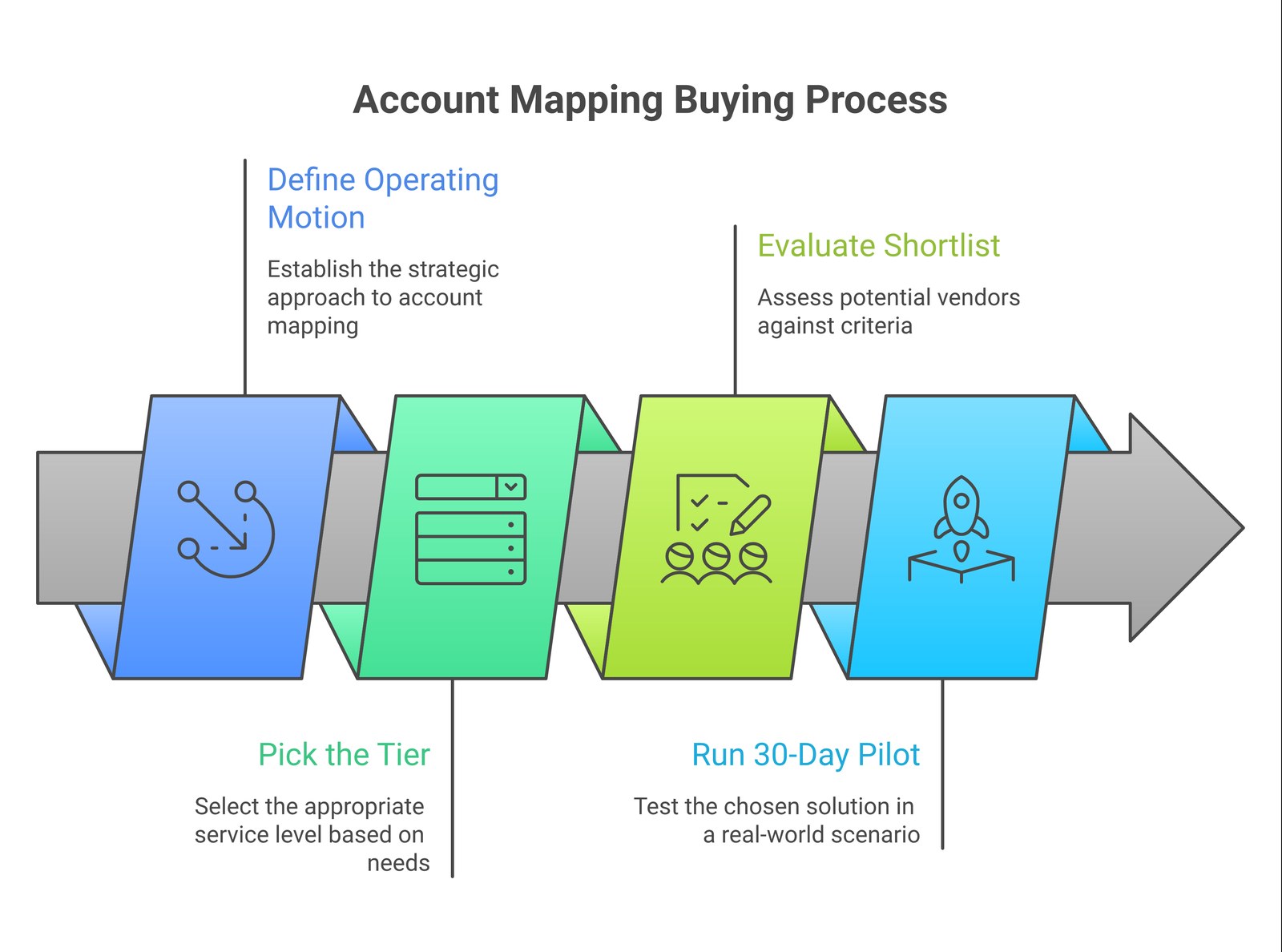
The buying motion has four steps and they have to happen in order: define the motion, pick the tier, evaluate the shortlist, run a 30-day pilot. Skipping a step is the most common reason a tool gets bought, deployed, and abandoned.
- Define the operating motion you’re buying for. Are you running ELG-style overlap analysis to feed a few high-value motions per quarter? Or are you running embedded co-sell where every AE has live overlap on the account record? The two motions have different tooling requirements.
- Pick the tier. Crossbeam Explorer will get an SMB-band partner team to first signal. Crossbeam Connector fits teams running an active partner motion with two to ten partners. Crossbeam Supernode fits teams running 20+ partner relationships with embedded workflows.
- Evaluate the shortlist on three criteria: integration depth with your CRM, partner-network density (how many of your top 20 partners are already on the same tool), and workflow surface (how does the data appear inside the AE’s normal day).
- Run a 30-day pilot with two specific partners and a defined success criterion. The criterion should be a deal, one identified joint opportunity sourced from the overlap data, not a count of overlap matches.
Common pitfalls
The pitfall pattern across account mapping deployments is consistent and recoverable. Three failure modes show up in the first 90 days, and all three are operating decisions, not tool decisions.
The first pitfall is buying for the partner team and not for the AE. The partner team gets the dashboard; the AE gets nothing inside the CRM record they actually look at. Account mapping data only changes deal outcomes when it shows up where the AE makes the decision.
The second pitfall is buying without partner consent. The data exchange requires a partner on the other side. If the partner you most want to map with isn’t on the same tool, the tool produces no value for that relationship. Confirm partner-side commitment before you sign, not after.
The third pitfall is deploying without an attribution rule. The whole point of account mapping is to feed partner attribution; if you haven’t decided whether overlap influence counts as partner-sourced or partner-influenced, the data will be politically contested every quarter. Decide the attribution rule first, deploy the tool second.
Tools to evaluate in 2026
| Category | Representative vendors | Best fit | What to verify |
|---|---|---|---|
| Standalone account mapping (tier-one) | Crossbeam | Teams running 5+ active partner relationships with embedded co-sell | Partner-network density for your top 10 partners |
| Standalone account mapping (distant challenger) | PartnerTap | Teams that prioritize specific workflows or pricing flexibility | Workflow surface inside your CRM |
| ELG / CRM-native | Salesforce + Crossbeam (via AppExchange), HubSpot + Crossbeam (via marketplace) | Teams that already standardized on a CRM-led ecosystem | Native UI surfacing; the reason to pick CRM-native is the AE workflow |
Treat Crossbeam as the tier-one standalone and verify which capability set you’re buying against your specific motion. ELG-led tooling, including the Crossbeam-Salesforce integration and Crossbeam-HubSpot integration, has matured significantly since 2023; if your team is CRM-anchored, the native surface is often the better workflow choice even if a competing standalone scores higher on raw features.
Forecastable’s POV
The tool is the easy part. The motion is the hard part. Most partner teams overspend two quarters on tool evaluation and underspend two quarters on the operating cadence that turns overlap data into closed pipeline. Reverse the proportions.
The structural failure I see across partner teams is that the tool gets purchased before the motion is defined, and the team spends the next two quarters trying to fit the motion to the tool. The teams that win commit to a specific motion first (embedded co-sell, ELG-style high-value escalation, or partner-led inbound qualification), and then pick the tool that best supports that one motion.
Two specific calls Forecastable makes consistently. First: account mapping data needs to live inside the AE’s CRM record, not in a partner-team dashboard. If the AE doesn’t see overlap signal during their normal qualification call, the data isn’t influencing pipeline. Second: account mapping is upstream of partner attribution. Decide the attribution rule (partner-sourced versus partner-influenced versus partner-assisted) before you deploy the tool, not after the first overlap match.
Frequently asked questions
What is the difference between account mapping and overlap analysis?
Account mapping is the data exchange and matching layer; overlap analysis is the practice of acting on the matches. Most modern tools cover both, but the operational decision (which accounts to escalate, with which partner, at which stage) is the work that earns the ROI.
Do I need an account mapping tool if my partners are already on a shared CRM?
Usually yes. Even with a shared CRM, partner data exchange requires permission scoping and governance. The tool layer handles the privacy controls and confidence-scored matching that a shared CRM does not.
How much do account mapping tools cost in 2026?
Crossbeam Explorer is free; Connector starts in the low five figures annually for mid-market teams; Supernode and enterprise tiers scale into six figures based on partner count and integration depth.
What is the right success metric for an account mapping tool?
Closed-won pipeline that traces back to overlap data. Match counts, dashboard views, and partner sync activity are leading indicators; the real metric is partner-attached deals that wouldn’t have happened without the tool surfacing the signal.
Should I deploy account mapping before or after I have a partner program structure in place?
After. The tool is a force multiplier for an existing motion, not a substitute for the motion. If the program structure is undefined, the tool produces overlap matches that nobody knows what to do with.
Are account mapping tools secure?
The tier-one vendors are SOC 2 Type II compliant and have mature data-residency controls. Verify against your specific regulatory footprint (GDPR for EU customers, CCPA for California, sector-specific rules for healthcare and finance).
Next step
If you’re evaluating tools, start with the operating motion: write the one-page motion definition before you take a vendor demo. The motion definition has three lines: who sees the data, what decision the data feeds, and what success looks like in 90 days.
Forecastable is an independent third-party professional services company. Our evaluations of other vendors are based on publicly-available information as of May 2026 and our own client experience.
Talk to our team about turning account-mapping data into co-sell pipeline →
By Alex Buckles
Uncover Your Growth Potential
Schedule a Discovery Call